Camerapixo Press Independent Visual Journalism Association - IVJA
Camerapixo Press
Independent Visual
Journalism Association – IVJA

Publisher
360 Heller Media
8635 W Sahara Ave #3170
Las Vegas, NV 89117-5858
USA

editorial@camerapixopress.com
pressid@camerapixopress.com
academy@camerapixopress.com
digicardone@camerapixopress.com

be kind and buy us coffee or tea

COVE PHOTO Sam Grozyan
image

Digi Mag Pro

Your Own Digital Magazines. Published Professionally. Build Your Publication Library.

DIGI MAG PRO is a professional publishing service from Camerapixo Press created for photographers who want to publish their photography more frequently and keep all of their publications organized in one place.

Your DIGI MAG PRO is individually designed and built using the Camerapixo QR Card System, with its own permanent link and QR code. It becomes your dedicated publication library, where your Camerapixo Press publications and Dedicated Digital Publications can be organized, presented, and accessed through one mobile focused system.

When you want to publish photography from a specific event, assignment, trip, project, or visual story, Camerapixo Press can prepare a Dedicated Digital Publication for you in PDF format and add it to your DIGI MAG PRO. Your Dedicated Digital Publications are also published and indexed on the Camerapixo Press platform, allowing you to gradually build your own publication library and professional publishing record.

You provide the photographs and necessary information, while Camerapixo Press takes care of the editorial preparation, design, publishing, and integration with your DIGI MAG PRO. You save time and can focus on photography.

ORDER DIGI MAG PRO

Publish More Often. Build Your Library.

If you regularly photograph events, sports competitions, concerts, conferences, assignments, or other projects, DIGI MAG PRO gives you the opportunity to publish your photography more frequently without having to wait for the regular Camerapixo Press publishing cycle.

Each new event, assignment, or photography project can become its own Dedicated Digital Publication, professionally prepared by Camerapixo Press and added to your DIGI MAG PRO. With every new publication, your personal publication library continues to grow.

Over time, you build a documented publishing history that you can share with clients, event organizers, schools, colleges, companies, and other institutions. It can also support the presentation of your professional activity when applying for media access or accreditation.

camerapixo-press-DIGI-MAG-PRO-info-box-FX
camerapixo-press-DIGI-MAG-PRO-info-box-FX3

All Your Publications in One Place

Your DIGI MAG PRO brings your Camerapixo Press publications together in one organized, mobile focused system built using the Camerapixo QR Card System. During the initial setup, we add all previous Camerapixo Press magazines featuring your photography. Future regular Camerapixo Press publications are also added at no additional cost, while each new Dedicated Digital Publication becomes part of the same growing library.

Each publication can be presented with its cover, title, short description, and access to the PDF. One permanent link and QR code lead to your entire DIGI MAG PRO, making it easy to access or share your complete publication library. The main navigation can include from one to four sections, helping organize your publications as your library grows.

Full Support from Camerapixo Press

Publishing your own Dedicated Digital Publications does not have to mean spending additional hours on design, layout, image selection, and technical preparation. With DIGI MAG PRO, Camerapixo Press handles the publishing process for you.

You provide the photographs and necessary information. Our team reviews the submitted material, makes the editorial selection, prepares the page layouts, and takes care of the overall presentation of your photography. Each publication is professionally prepared using an appropriate Camerapixo Press magazine template.

You receive a complete digital publication ready to become part of your DIGI MAG PRO and your publishing history with Camerapixo Press. Instead of spending your time on design and technical preparation, you can focus on photography, your next assignments, and growing your business.

camerapixo-press-DIGI-MAG-PRO-info-box5
camerapixo-press-DIGI-MAG-PRO-info-box1

Integration with DigiCardOne

You can connect DIGI MAG PRO with DigiCardOne, creating a unified environment for presenting your professional activity and publication library.

DigiCardOne serves as your professional digital business card, where you can present your contact information, portfolio, services, and key professional details. DIGI MAG PRO extends this environment with your publications and growing publishing history.

To connect the two, simply add your DIGI MAG PRO link to DigiCardOne. For a more prominent visual connection, we can also create a custom promotional banner that leads directly to your DIGI MAG PRO.

This gives you two convenient ways to direct visitors to your publication library: through a direct link or a dedicated banner. DigiCardOne and DIGI MAG PRO can work together as one connected professional environment that you can easily share with clients, event organizers, institutions, and other professional contacts.

More Than Publications

Publications remain at the core of DIGI MAG PRO, but your individual system can also be expanded with additional materials related to your photography and professional activity.

You can add cards presenting your portfolio, photography books, calendars, prints, workshops, photography sessions, services, current projects, and other materials you want to share with clients or professional contacts.

These additional cards can showcase specific services, promote current projects, or direct visitors to selected offers and resources. This allows your DIGI MAG PRO to evolve alongside your photography business while keeping your publications at the center of the experience.

You provide the necessary materials and information, and we prepare the additional elements to visually match your DIGI MAG PRO. If an addition requires a more extensive scope of work, we will always agree on the cost with you before starting.

camerapixo-press-DIGI-MAG-PRO-info-box8
camerapixo-press-DIGI-MAG-PRO-info-box4

How Much Does DIGI MAG PRO Cost?

DIGI MAG PRO is available to active Camerapixo Press Members, including Business Connect Members. The initial setup includes your individual DIGI MAG PRO, all previous Camerapixo Press publications featuring your photography, and hosting and technical maintenance for the first year.

  • DIGI MAG PRO Setup — $148 one time. Individual design and preparation, permanent link and QR code, all previous Camerapixo Press publications, plus first year hosting and technical maintenance.
  • Hosting & Maintenance — $89 per year. Starting from the second year, this keeps your DIGI MAG PRO online and maintains its existing content.
  • Dedicated Digital Publication — $68 per publication. A professionally prepared publication based on one event, assignment, project, or photographic story, published by Camerapixo Press and added to your DIGI MAG PRO.

Future regular Camerapixo Press publications featuring your photography are added to your DIGI MAG PRO at no additional cost.

See How DIGI MAG PRO Works

Every DIGI MAG PRO can have its own individual design, structure, and navigation, tailored to the photographer’s work and the way their publications need to be organized.

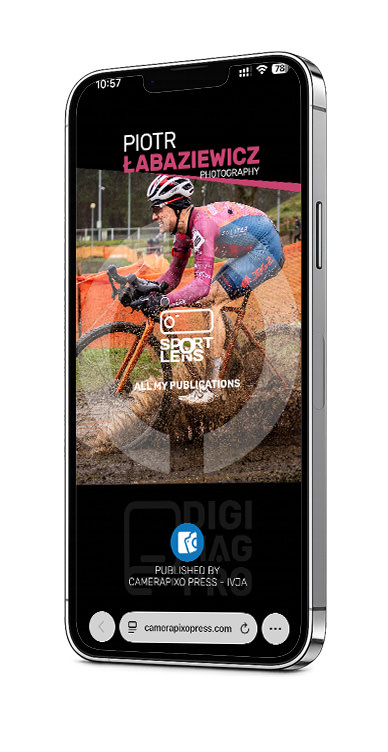
Below you can explore four sample DIGI MAG PRO presentations built using the Camerapixo QR Card System. Open any example directly or scan its QR code with your smartphone to see how publications can be organized, accessed, and presented within one DIGI MAG PRO.

SAMPLE AVAILABLE SOON
STAY TUNED!

SAMPLE AVAILABLE SOON
STAY TUNED!

Frequently Asked Questions

What Is DIGI MAG PRO and How Does It Work?

DIGI MAG PRO is a professional publishing service from Camerapixo Press built using the Camerapixo QR Card System. Your individual DIGI MAG PRO provides one organized place where your Camerapixo Press publications can be presented and accessed through a permanent link and QR code. As your publication library grows, new publications are added to the same DIGI MAG PRO rather than creating a separate system each time.

How Do I Get Started with DIGI MAG PRO?

After you order DIGI MAG PRO, we collect the information and materials needed to prepare your individual design, structure, navigation, and initial publication library. Once the first complete version is ready, we send you the link for review. You can check the design, navigation, structure, and content before we complete the setup.

Do I Need a Camerapixo Press Membership to Use DIGI MAG PRO?

Yes. DIGI MAG PRO is available to active Camerapixo Press Members, including Business Connect Members. DIGI MAG PRO is an additional professional publishing service and is maintained separately from your Membership.

What Do I Need to Set Up My DIGI MAG PRO?

We need your basic professional information, a main photograph for the design, a short description of your photography work, your website or portfolio link if applicable, and information about your previous Camerapixo Press publications. We also work with you to determine the structure and navigation of your DIGI MAG PRO so it can remain organized as your publication library grows.

What Happens to My Previous Camerapixo Press Publications?

As part of the initial setup, we add all previous Camerapixo Press magazines in which your photography has been published. There is no limit on the number of your previous Camerapixo Press publications that can be included. Future regular Camerapixo Press publications featuring your photography are also added to your DIGI MAG PRO at no additional cost.

What Is a Dedicated Digital Publication?

A Dedicated Digital Publication is an individual publication prepared by Camerapixo Press from one specific photography event, assignment, project, trip, or visual story. It is professionally designed using an appropriate Camerapixo Press magazine template, published in PDF format, added to your DIGI MAG PRO, and indexed within the Camerapixo Press publishing environment.

How Should I Prepare Materials for a Dedicated Digital Publication?

For each Dedicated Digital Publication, you can submit:

  • up to 80 high quality JPG photographs
  • the title or name of the event, assignment, or project
  • the date and location, when applicable
  • a short description
  • any additional information relevant to the publication
  • information about photographs you consider particularly important to the story

The final publication may contain up to 60 pages. Camerapixo Press reviews the submitted photography and makes the final editorial selection based on image quality, storytelling, visual flow, and the overall design of the publication.

Do I Need to Design or Prepare the Publication Myself?

No. You provide the photographs and necessary information, while Camerapixo Press handles the editorial selection, design, layout, technical preparation, and publishing. Before publication, you receive the complete version for review and can request corrections or adjustments before final approval.

How Often Can I Order a New Dedicated Digital Publication?

You can order a new Dedicated Digital Publication whenever you have a specific event, assignment, project, or photographic story that you want to publish. Each new publication can be added to your existing DIGI MAG PRO, allowing your publication library to grow over time.

Can I Publish Different Types of Photography in One DIGI MAG PRO?

Yes. Your DIGI MAG PRO can contain publications covering different areas of your photography, including sports, events, portraits, documentary photography, travel, landscape, and other subjects. For each Dedicated Digital Publication, Camerapixo Press can select an appropriate established magazine title and template to match the subject and character of the photography.

How Can DIGI MAG PRO Help Build My Professional Publishing History?

DIGI MAG PRO brings your Camerapixo Press publications together in one organized publication library. Dedicated Digital Publications are also published and indexed within the Camerapixo Press platform. Over time, this creates a documented publishing history that you can share with clients, event organizers, institutions, and other professional contacts.

Can I Use DIGI MAG PRO When Applying for Accreditation or Media Access?

Yes. Your permanent DIGI MAG PRO link gives you a convenient way to present your publication library and documented publishing activity when applying for accreditation or media access. DIGI MAG PRO does not guarantee accreditation. Decisions regarding accreditation or media access are always made by the event organizer or relevant institution.

Is It Worth Connecting DIGI MAG PRO with DigiCardOne?

Yes. DigiCardOne and DIGI MAG PRO serve different but complementary purposes. DigiCardOne presents your professional identity, contact information, portfolio, services, and important links. DIGI MAG PRO presents your publications and growing publishing history. You can connect the two through a direct link, and we can also create a dedicated promotional banner in DigiCardOne that leads directly to your DIGI MAG PRO.


Being Published Matters

JOIN us today
CREATE ACCOUNT

Camerapixo Press Independent Visual Journalism Association - IVJA

We use cookies to give you the best online experience. By agreeing, you accept the use of cookies in accordance with our cookie policy.

Close Popup
Privacy Settings saved!
Privacy Settings

When you visit any web site, it may store or retrieve information on your browser, mostly in the form of cookies. Control your personal Cookie Services here.

These cookies are necessary for the website to function and cannot be switched off in our systems.

Technical Cookies
In order to use this website we use the following technically required cookies
  • wordpress_test_cookie
  • wordpress_logged_in_
  • wordpress_sec

WooCommerce
We use WooCommerce as a shopping system. For cart and order processing 2 cookies will be stored. This cookies are strictly necessary and can not be turned off.
  • woocommerce_cart_hash
  • woocommerce_items_in_cart

Decline all Services
Save
Accept all Services